Geocoding
Overview
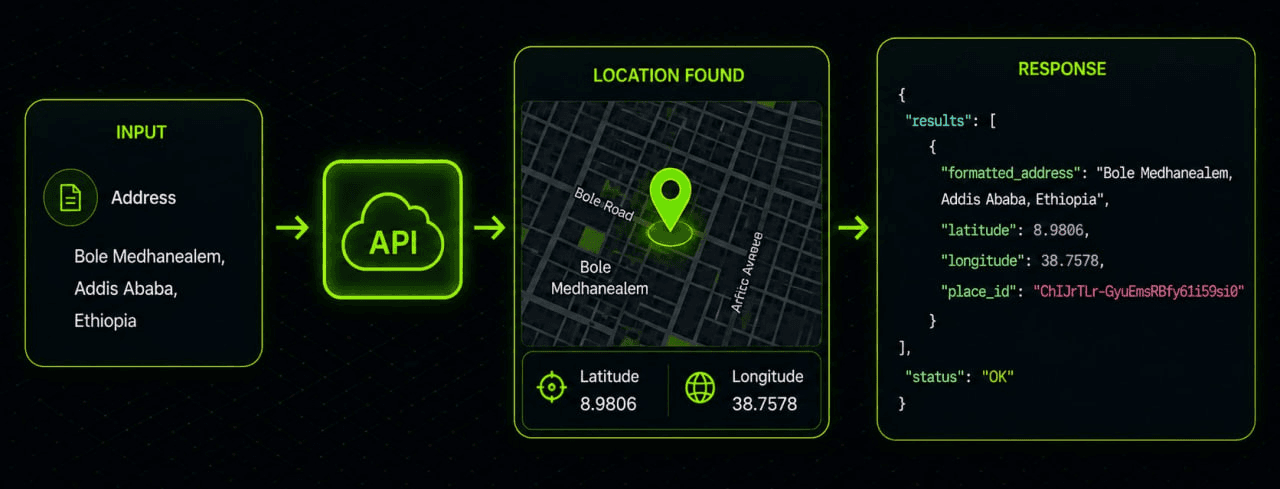
Geocoding turns user-entered place text into geographic coordinates and place records, while reverse geocoding turns coordinates into a readable place or address.
That forward/reverse split is the standard shape used by major geocoding platforms such as Mapbox and Google, and Ambalay publicly describes its own geocoding offering as converting addresses to coordinates and back.
The documentation below preserves the endpoint contract while reorganizing it into a developer-friendly reference flow:
- Authentication
- Search Places
- Reverse Geocoding
- Error Handling
- Implementation Guidance
Authentication and Base URL
All examples below use the development base URL:
https://api.dev.ambalaymaps.comBoth endpoints in this page share the same access model.
Access Model
| Item | Value |
|---|---|
| Allowed Service | GEO_CODING |
| Billed Service | GEO_CODING |
| Authentication | x-ambalay-key: {API_KEY} |
| Method | GET |
Use the API key in the request header:
x-ambalay-key: {API_KEY}A minimal authenticated request looks like this:
GET /services/geo_coding/... HTTP/1.1
Host: api.dev.ambalaymaps.com
x-ambalay-key: {API_KEY}
Search Places
Use Search Places when you want to convert a text query such as a city name, neighborhood, campus, or address into matching place results.
In the broader geocoding ecosystem, this operation is commonly called forward geocoding.
It is the right fit for:
- Search boxes
- Place pickers
- Lightweight autocomplete-style interfaces
Endpoint Summary
| Item | Value |
|---|---|
| Method | GET |
| Path | /services/geo_coding/search |
| Purpose | Search places by text and return matching locations |
Query Parameters
| Parameter | Type | Required | Description |
|---|---|---|---|
term | string | Yes | Address or place name to search |
limit | integer | No | Number of results to return. Default: 10, Maximum: 50 |
Example Request
The example below searches for results related to Addis Ababa.
cURL
curl "https://api.dev.ambalaymaps.com/services/geo_coding/search?term=Addis%20Ababa&limit=5" \
-H "x-ambalay-key: YOUR_API_KEY"
HTTP Request
GET /services/geo_coding/search?term=Addis%20Ababa&limit=5 HTTP/1.1
Host: api.dev.ambalaymaps.com
x-ambalay-key: {API_KEY}
Success Response
{
"status": "SUCCESS",
"data": {
  "items": [
    {
      "id": "place-id",
      "name": "Addis Ababa",
      "label": "Addis Ababa, Ethiopia",
      "loc": {
        "lat": 8.9806,
        "lon": 38.7578
      }
    },
    {
      "id": "place-id-2",
      "name": "Addis Ababa University",
      "label": "Addis Ababa University, Ethiopia",
      "loc": {
        "lat": 9.0010,
        "lon": 38.7530
      }
    }
  ]
},
"message": "GEO_CODING_SEARCH_SUCCESS",
"timestamp": "2026-04-29T06:00:00.000Z",
"requestId": "request-id"
}
Response Fields
| Field | Type | Description |
|---|---|---|
data.items | array | List of matching places |
id | string | Unique place identifier |
name | string | Short place name |
label | string | Full human-readable place label or address |
loc.lat | number | Latitude |
loc.lon | number | Longitude |
Usage Notes
termmust be a non-empty string- Use
limitto keep responses small when powering a search UI - Increase
limitonly when broader result sets are required - A successful request can still return an empty
itemsarray - Empty results should be treated as valid no-results outcomes rather than application errors
Common Errors
| Error Code |
|---|
API_KEY_SERVICE_NOT_ALLOWED |
VALIDATION_ERROR |
MISSING_API_KEY |
INVALID_API_KEY |
Reverse Geocoding
Use Reverse Geocoding when you already have coordinates and want the nearest readable place.
In most mapping platforms, reverse lookup returns the closest known address or place representation for a latitude/longitude pair.
The granularity of the result can vary from:
- Precise address
- Neighborhood
- City
- Administrative area
Endpoint Summary
| Item | Value |
|---|---|
| Method | GET |
| Path | /services/geo_coding/reverse |
| Purpose | Convert coordinates into a readable place |
Query Parameters
| Parameter | Type | Required | Description |
|---|---|---|---|
lat | number | Yes | Latitude |
lon | number | Yes | Longitude |
Example Request
cURL
curl "https://api.dev.ambalaymaps.com/services/geo_coding/reverse?lat=8.9806&lon=38.7578" \
-H "x-ambalay-key: YOUR_API_KEY"
HTTP Request
GET /services/geo_coding/reverse?lat=8.9806&lon=38.7578 HTTP/1.1
Host: api.dev.ambalaymaps.com
x-ambalay-key: {API_KEY}
Success Response
{
"status": "SUCCESS",
"data": {
  "item": {
    "id": "place-id",
    "name": "Kazanchis",
    "label": "Kazanchis, Addis Ababa, Ethiopia",
    "loc": {
      "lat": 8.9806,
      "lon": 38.7578
    }
  }
},
"message": "GEO_CODING_REVERSE_SUCCESS",
"timestamp": "2026-04-29T06:00:00.000Z",
"requestId": "request-id"
}
Response Fields
| Field | Type | Description |
|---|---|---|
data.item | object | null | Nearest place, if found |
id | string | Unique place identifier |
name | string | Short place name |
label | string | Full human-readable place label or address |
loc.lat | number | Latitude |
loc.lon | number | Longitude |
Validation Error Example
{
"status": "ERROR",
"data": {
  "lat": "lat must be a valid number"
},
"message": "VALIDATION_ERROR",
"timestamp": "2026-04-29T06:00:00.000Z",
"requestId": "request-id"
}
Usage Notes
- Ensure
latandlonare valid numeric values before sending requests - Reverse geocoding is ideal for:
- map-click interactions
- dropped pins
- GPS coordinates
- “What’s here?” features
- If no nearby place can be resolved,
itemmay be empty ornull - Reverse geocoding should be treated as a nearest-match lookup rather than a guaranteed parcel-accurate address
Common Errors
| Error Code |
|---|
VALIDATION_ERROR |
API_KEY_SERVICE_NOT_ALLOWED |
MISSING_API_KEY |
INVALID_API_KEY |
Errors and Troubleshooting
A clean integration should distinguish between:
- Authentication failures
- Service entitlement issues
- Input validation problems
- Valid no-result responses
In practice, geocoding systems often return no match not because the request is malformed, but because the service cannot confidently resolve the query or coordinate to a result.
Reverse geocoding should be handled defensively because result specificity can vary.
Troubleshooting Checklist
| Error Code | What to Check |
|---|---|
MISSING_API_KEY | Confirm the x-ambalay-key header is present |
INVALID_API_KEY | Verify the key value and format |
API_KEY_SERVICE_NOT_ALLOWED | Ensure the key can access GEO_CODING |
VALIDATION_ERROR | Recheck term, limit, lat, and lon |
Empty items or empty item | Treat as a valid no-results response |
Production Recommendations
For production debugging:
- Log
message - Log
timestamp - Log
requestId
Additional best practices:
- URL-encode the
termparameter - Validate coordinates before requests
- Show friendly fallback messages such as:
No matching place foundinstead of generic failure banners.
Implementation Guidance
The cleanest developer experience usually comes from treating text search and reverse lookup as two separate user flows.
Recommended Patterns
Text Search
- Keep
limitmodest - Issue requests deliberately
- Keep search results relevant and stable
Coordinate Lookup
Design the client as though the returned place is:
- The nearest known representation
- Not necessarily the only correct answer
This pattern aligns with how major mapping platforms separate:
- Forward search
- Reverse lookup
- Richer interactive search experiences
Production Checklist
- Send
x-ambalay-keyon every request - Use
/services/geo_coding/searchfor text search - Use
/services/geo_coding/reversefor coordinate lookup - Keep responses small with
limit - Treat empty results as valid
- Log
requestIdfor support and traceability